

My Work
Everything assigned to you and waiting on you, from tasks and deliverables to your jobs and approvals, on one page.
My Work is your personal slice of the company’s work: what’s assigned to you and what’s waiting on your decision, sorted by what needs you first.
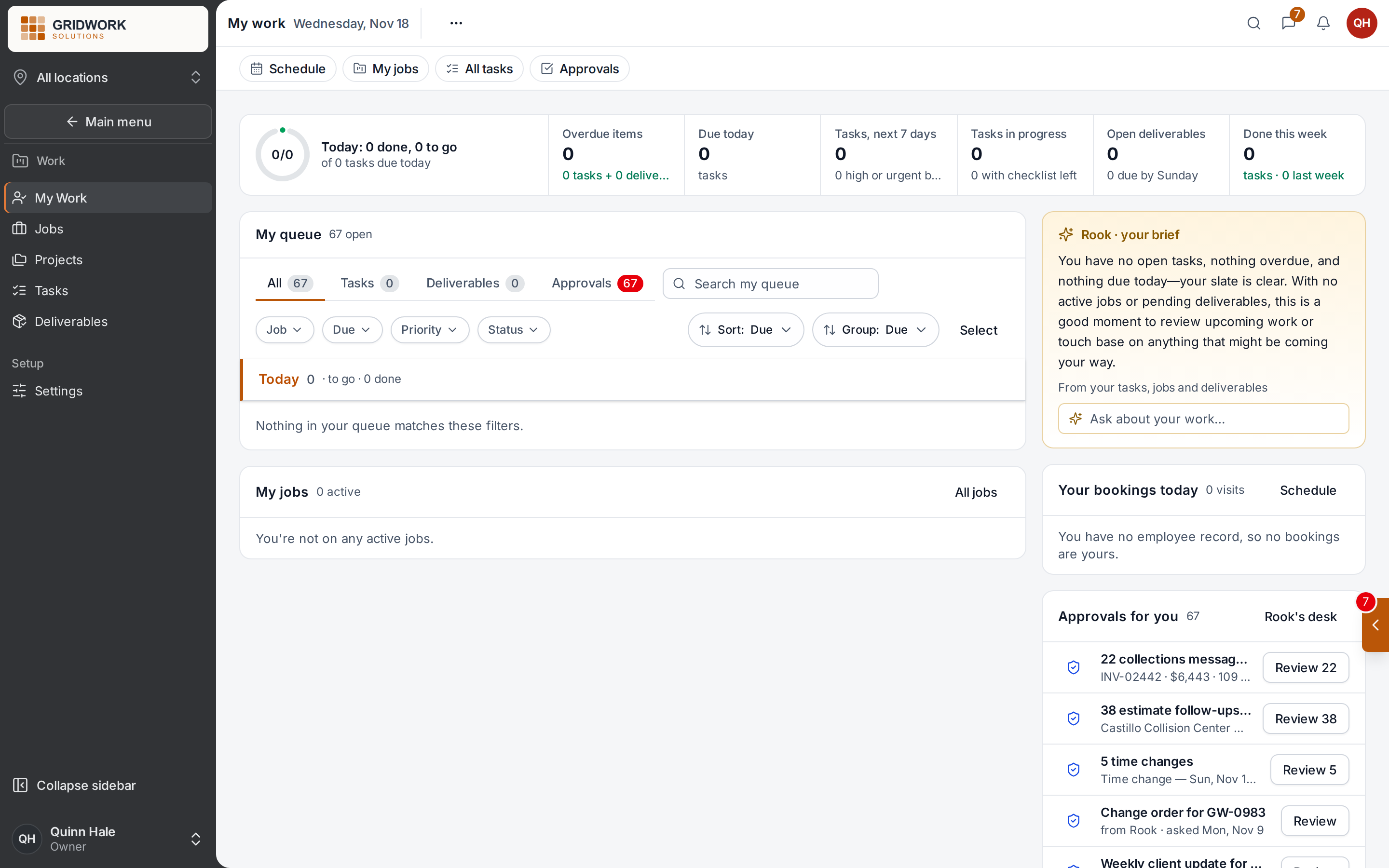
What’s on it
Section titled “What’s on it”- Shortcuts across the top: Schedule, My jobs, All tasks and, if you approve things, Approvals. The ⋯ menu has Print today.
- Today’s progress: a ring of how many of today’s tasks you’ve done, then six counters: Overdue items, Due today, Tasks, next 7 days, Tasks in progress, Open deliverables and Done this week.
- My queue: your tasks and deliverables, plus approvals waiting on you, in one list. The tabs All, Tasks, Deliverables and Approvals narrow it; so do the Job, Due, Priority and Status filters and Search my queue. Sort and Group order it by due date, priority or job.
- My jobs: the active jobs you’re on, with Ending soon, Past end and Starting tabs, and All jobs to see the full list.
- Rook · your brief: a short summary of your day, with Ask about your work… to follow up in the chat.
- Your bookings today: your visits from the schedule.
- Approvals for you: requests waiting on your decision, each with a Review button.
- Waiting on others: things you asked for that someone else still owes.
Plan your day
Section titled “Plan your day”- In the Today group, type into Add a task for today… and choose Add for today.
- Snooze all moves everything still due today to tomorrow; Plan the week opens the schedule.
- Select lets you tick items in your queue and choose Move to… to give them a new date.
When nothing is assigned to you, the queue says Nothing assigned to you yet: When a PM assigns you a task, a job or a deliverable, it shows here, grouped by when it’s due.